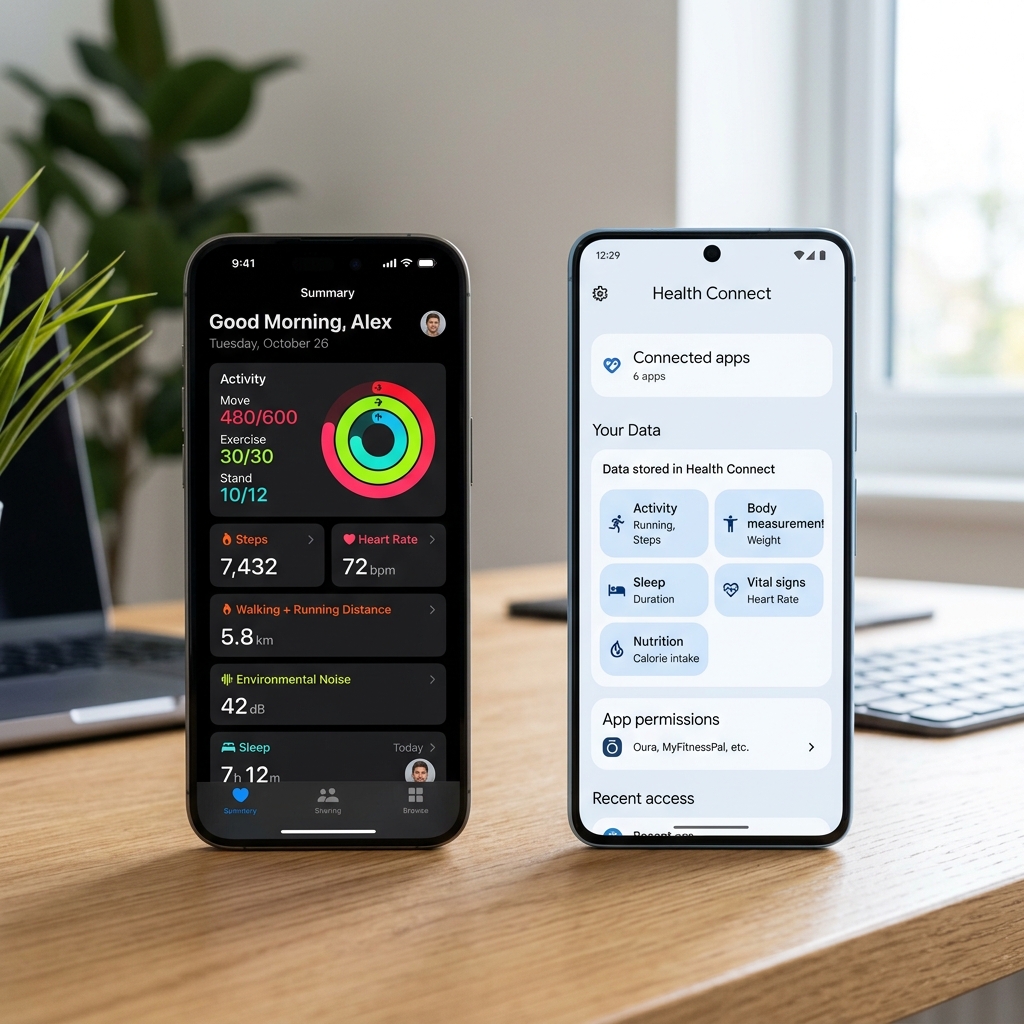
Your phone and wearables collect an incredible amount of health data — steps, heart rate, sleep, HRV, blood oxygen, and more. But where does all that data go, and how can fitness apps like UltraFit360 actually use it to help you train smarter?
The answer lies in two health data platforms: Apple Health (iOS) and Google Health Connect (Android). Let's break down how they work and what they mean for your fitness.
What is Apple Health?
Apple Health (previously HealthKit) is Apple's centralised health data platform on iPhone. It acts as a hub — collecting data from your Apple Watch, third-party apps, and manual entries into one unified health record.
- Built into every iPhone (iOS 8+)
- Deep integration with Apple Watch for continuous monitoring
- Supports over 100 health data types
- On-device processing — data stays on your phone by default
- Third-party apps can read AND write data (with user permission)
What is Google Health Connect?
Health Connect (previously Google Fit) is Google's equivalent for Android. It launched as a standalone app in 2022 and became built into Android 14+.
- Available on Android 9+ (as an app) and built into Android 14+
- Works with Wear OS, Samsung Galaxy Watch, Fitbit, and other Android wearables
- Supports over 80 health data types
- Granular permission controls per data type
- Third-party apps can read AND write data (with user permission)
Data Type Comparison
| Data Type | Apple Health | Health Connect | Used by UltraFit360 |
|---|---|---|---|
| Steps | ✓ | ✓ | ✓ Daily count + trends |
| Heart Rate | ✓ | ✓ | ✓ Workout + resting |
| Resting Heart Rate | ✓ | ✓ | ✓ Recovery indicator |
| HRV | ✓ | ✓ | ✓ Stress/recovery |
| VO2 Max | ✓ | ✓ | ✓ Fitness level |
| Sleep Duration | ✓ | ✓ | ✓ Recovery scoring |
| Sleep Stages | ✓ | ✓ | ✓ Deep/REM/Light |
| Active Calories | ✓ | ✓ | ✓ Energy balance |
| Body Weight | ✓ | ✓ | ✓ Trend tracking |
| Blood Oxygen (SpO2) | ✓ | ✓ | Coming soon |
How UltraFit360 Uses Your Health Data
UltraFit360 doesn't just read your data — it analyses it to give you actionable insights:
The SSR Score (Strain / Stress / Recovery)
Every morning, UltraFit360 calculates three scores from your health data:
- Strain — How hard did you push yesterday? Based on active calories, workout heart rate, and exercise duration.
- Stress — How stressed is your body? Based on HRV trends, resting heart rate changes, and sleep quality.
- Recovery — How ready are you to train? Combines sleep duration, sleep stages, HRV, and resting heart rate.
Weekly AI Health Report
The Health Agent (one of 4 AI agents in Coach's Corner) reviews your entire week of health data and identifies sleep patterns, recovery trends, overtraining signals, and resting heart rate patterns.
Energy Balance Dashboard
By combining calories consumed (from meal logging) with calories burned (from Apple Health / Health Connect), UltraFit360 shows your true net energy balance.
How to Maximise Your Health Data
- Wear your watch to sleep — Sleep data is crucial for recovery scoring. Aim for 5–6 nights per week.
- Enable all permissions — When UltraFit360 asks for access, enable everything. More data = better insights.
- Be consistent — The AI needs at least 7 days of data to give meaningful recovery recommendations.
- Check your SSR score before training — If recovery is low, consider a light session instead of a heavy workout.
Privacy: Is Your Health Data Safe?
Both Apple Health and Health Connect are privacy-first platforms. Data is stored on your device, apps must request explicit permission for each data type, and you can revoke access at any time. Read our full Privacy Policy for details.
Connect Your Health Data to AI Coaching
Sync Apple Health or Health Connect with UltraFit360 — get SSR scores, recovery insights, and weekly reports.