How to do a Dumbbell Squat
The Dumbbell Squat is a beginner dumbbell exercise that works your glutes and quads, with help from your hamstrings and calves.
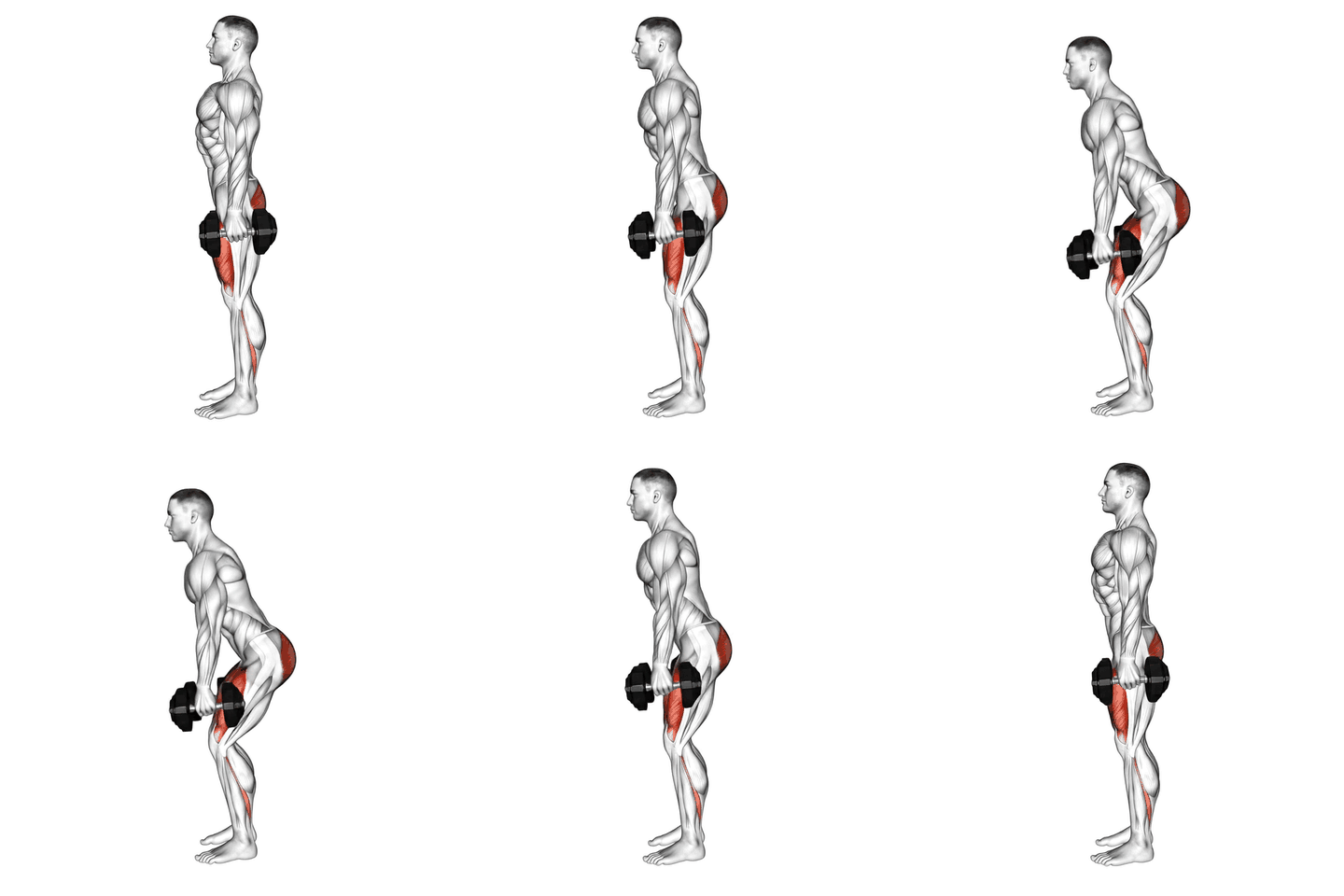
How to do a Dumbbell Squat, step by step
- Stand with your feet shoulder-width apart, holding a dumbbell in each hand at your sides.
- Keeping your chest up and core engaged, lower your body down by bending at the knees and hips, as if sitting back into a chair.
- Continue lowering until your thighs are parallel to the ground, or as low as you can comfortably go.
- Pause for a moment at the bottom, then push through your heels to return to the starting position.
- Repeat for the desired number of repetitions.
Muscles worked
| Target muscles | Glutes Quads |
|---|---|
| Secondary muscles | Hamstrings Calves |
| Equipment | Dumbbell |
| Difficulty | Beginner |
Common mistakes
- Rounding the back
- Knees caving in
- Not reaching adequate depth
- Using momentum
Sets and reps by goal
| Goal | Sets x reps |
|---|---|
| Strength | 4-6 sets x 3-6 reps |
| Muscle growth | 3-4 sets x 8-12 reps |
| Endurance | 2-3 sets x 15-20 reps |
| Power | 3-5 sets x 3-5 reps |
Alternatives, progressions and regressions
More exercises for the same muscles
Frequently asked questions
What muscles does the Dumbbell Squat work?
The Dumbbell Squat mainly works your glutes and quads. It also works your hamstrings and calves.
Is the Dumbbell Squat good for beginners?
Yes. The Dumbbell Squat is a beginner-friendly exercise. Start with a light load or no load, learn the movement first and add weight gradually.
How many sets and reps of the Dumbbell Squat should I do?
A good starting point is 4-6 sets x 3-6 reps for strength, 3-4 sets x 8-12 reps for muscle growth and 2-3 sets x 15-20 reps for endurance. Rest 1 to 3 minutes between sets and add weight when you reach the top of the rep range with good form.
What can I do instead of the Dumbbell Squat?
Good alternatives are Barbell Back Squat, Curtsey Squat and Jump Squat.
Put it in a workout plan
Track your Dumbbell Squat in UltraFit360
Log sets and reps, see your previous weights and let the app build your program. Free on iOS and Android.