
A prospect's first question is rarely "what is your price". It is "can I do this if I travel?", "do you work with beginners?" or "how does it work?" If nobody answers for a day, many of them move on. An AI assistant on your coaching page answers those questions while you are coaching or asleep, and passes you the people worth a call. The screenshots in this article show an example coach, Maya Reyes, a made-up online fat-loss and strength coach in Lisbon. They are not a real coach or real clients.
What the assistant does on your coaching page
On your coaching page (ultrafit360.com/coaches/<username>), a panel reads "Chat with <your name>'s assistant". A visitor types a name and an email or phone number, presses Start chat and asks a question. The assistant answers from the FAQ you gave it, asks a few questions to understand them, and records their details. A visitor who does not want to chat can use "Prefer to just leave your details?" and fill in a form instead.
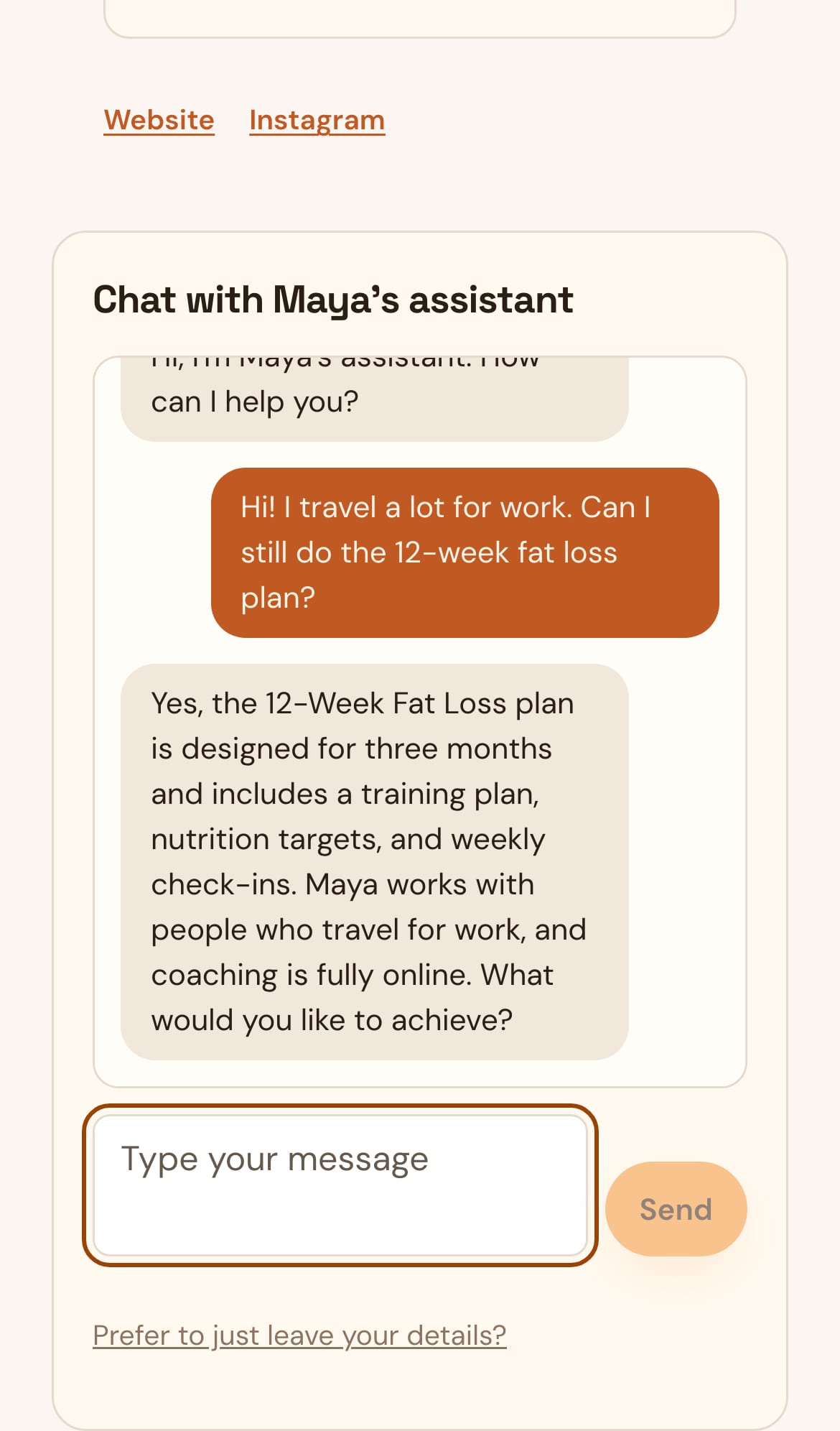
A prospect asks the example coach's assistant whether the plan works while travelling.
It is never you
The assistant is introduced as "<name>'s assistant", for example "Hi, I'm Maya's assistant. How can I help you?" It does not claim to be the coach, and your page does not suggest it is. That matters for trust: a prospect who later finds out they were talking to a bot posing as you will not book. The assistant answers questions and takes details; you do the coaching.
Answers come from your own FAQ
You decide what it knows. In Assistant in the coach portal, upload a short FAQ document and turn the public chat on. Write it the way you would answer a friend:
- How your coaching works week to week (training plan, nutrition targets, check-ins).
- Your packages and how long each lasts.
- Who you work best with, and who you do not.
- Whether coaching is online, in person or both, and your time zone and languages.
- What you need from a client (time per week, equipment).
Stick to what you are happy to say in public. If your FAQ does not mention something, the assistant has no answer from you to give, so cover the questions you hear most. Update the document when your packages or hours change.
Qualifying questions that save you the first call
Besides answering, the assistant asks a few questions to qualify the prospect:
- Their goal.
- Whether they want online or in-person coaching.
- When they want to start.
- Their budget.
- How many sessions a week they can do.
With those five answers you can tell, before you speak to anyone, who is a fit. Someone who wants in-person sessions in a city you do not work in can be answered kindly and quickly. Someone who wants to start next week, can train three times and has a budget that matches your packages gets a booking link the same day.
Details land in Leads with the source
Every prospect's details go into Leads, the pipeline in the coach portal, with where they came from, for example Web form, Instagram or Link page. You see a list with name, source, stage, last contact and next follow-up, and you move each person through stages as you talk to them.
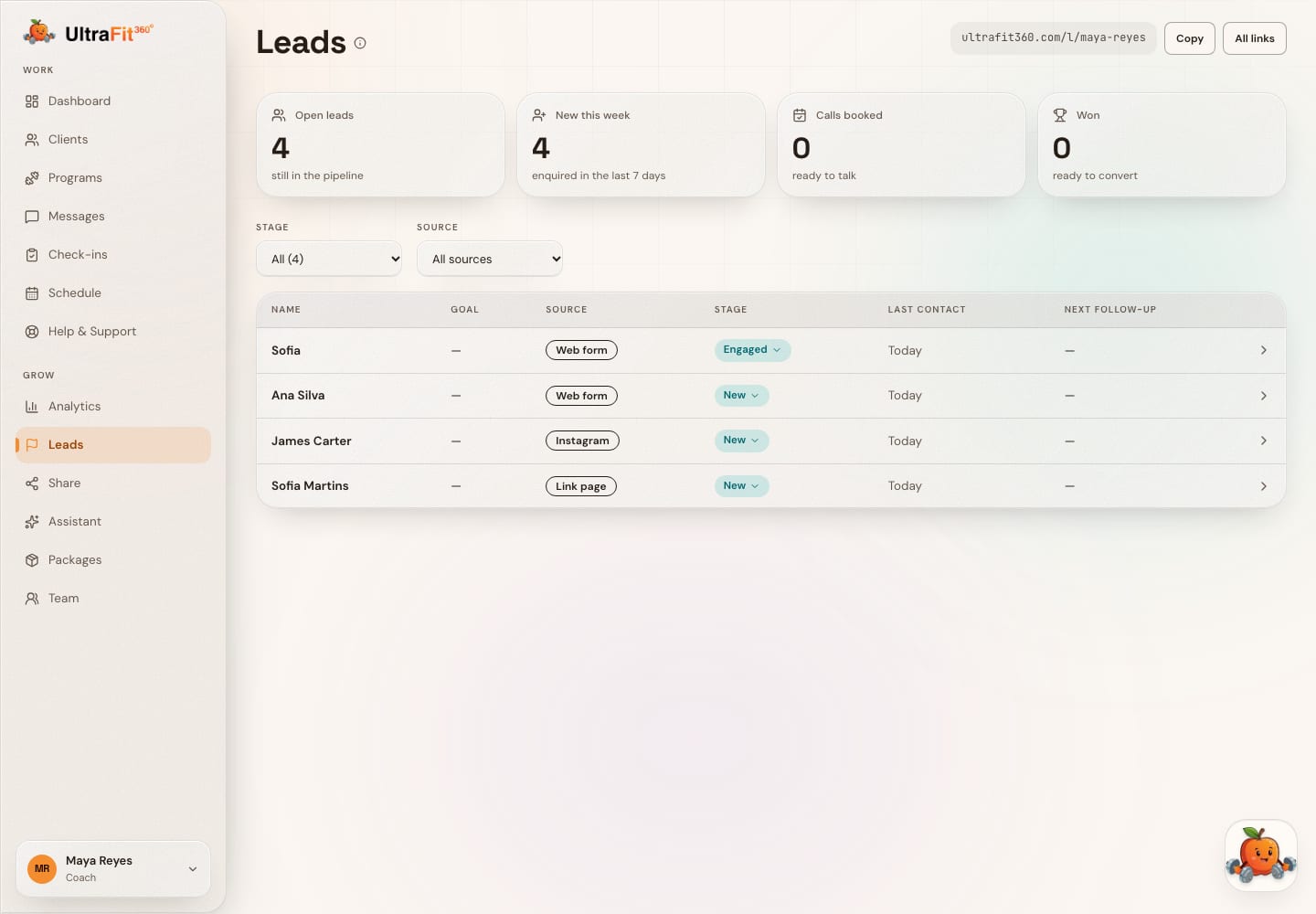
Leads for the example coach, with a source on every enquiry.
Open a lead and you can send a booking link made for them. See online booking for fitness coaches. The source helps you decide where to spend time: if most good leads come from your link page, write more content that points to your bio link, and see link in bio for fitness coaches.
What a good conversation looks like
A prospect writes: "I travel a lot for work. Can I still do the 12-week plan?" The assistant answers from the FAQ that the plan is built for three months, includes a training plan, nutrition targets and weekly check-ins, that you work with people who travel and that coaching is online, then asks what they want to achieve. Two or three messages later it has their goal, their start date and how many days a week they can train, and it has saved their details.
When you open Leads the next morning, you are not starting from a blank name and an email address. You can see who they are and what they want, so your first message can be specific: "Hi Sofia, three sessions a week and a January start works for my spring group." That kind of reply gets answered far more often than "Thanks for your enquiry".
How the other apps handle enquiries
Among the apps we checked on November 26, 2026, none lists an AI that answers prospects. Everfit has an AI match tool that pairs prospects with coaches and Smart Response, which drafts replies to messages from existing clients (see everfit.io). Trainera's TRAI and Kahunas's Whim help coaches build plans and run clients. Kahunas says Whim "never messages clients or assigns plans on its own" (see kahunas.io). Coachway has lead forms with a pipeline and UTM tracking, but no assistant that answers (see coachway.io). Those are good tools for what they do; the difference is who the AI is talking to.
What it cannot do
- It is not a replacement for a call. It qualifies; you close.
- It knows only what is in your FAQ and your page, so it can be incomplete. Read some conversations and fix gaps in your document.
- It does not handle payments. UltraFit360 has no client payments or billing, so you charge clients elsewhere.
- It will not make promises about results on your behalf. Keep claims out of your FAQ that you would not make yourself.
Set it up in three steps
- Write a one-page FAQ in plain language and upload it in Assistant.
- Turn the public chat on. Open your coaching page on your phone and ask it three questions you hear every week.
- Check Leads each morning. Reply to new ones within a day and send a booking link to the good ones.
The full chain, from being listed to becoming a client, is in how fitness coaches get found. If you compare tools, start with the Coach Catalyst comparison.
The assistant works best when every post and bio sends people to it. The fitness coach client funnel guide shows the whole path, from social media to a booked call.
Frequently asked questions
How does an AI assistant answer client enquiries for a coach?
On your coaching page, prospects can chat with "your name's assistant". It answers from the FAQ you upload, asks a few qualifying questions and records their details in Leads with the source. You then follow up and send a booking link to those worth a call.
Does the assistant pretend to be me?
No. It is introduced as "<name>'s assistant", for example "Maya's assistant", and never as the coach. The chat panel on the page says the same.
What does the assistant ask prospects?
It asks about their goal, whether they want online or in-person coaching, when they want to start, their budget and how many sessions a week they can do. You see those answers with their contact details in Leads.
Where do the details go?
Into Leads, the lead pipeline in the coach portal, with the source of the enquiry, such as Link page or Instagram. You can move each lead through stages, add notes and follow-ups, and send a booking link from the lead's panel.
Can a prospect choose not to chat?
Yes. The chat panel has a "Prefer to just leave your details?" option that opens a short form instead. Details from the form go into Leads too.
See the coach platform
A coach directory listing, a coaching page with an AI assistant, booking and a bio link, then the client app.
Early bird offer: UltraFit360 is free for coaches today. Paid plans launch in January 2027. The first 250 coaches and teams stay free for 12 months after launch; every other coach gets 6 months free from launch.