
Most online coaches get their first clients from people they already know, then hit a wall. Posting on Instagram brings followers, not always enquiries. This guide is about the plumbing between "someone is interested" and "someone is a client": how people find you, what they see, how they ask questions and how they get on a call. The screenshots in this article show an example coach, Maya Reyes, a made-up online fat-loss and strength coach in Lisbon. They are not a real coach or real clients.
Other coaching apps manage the clients you already have. UltraFit360 also gets you clients: you're listed in the coach directory, your coaching page has an AI assistant that answers enquiries, prospects book a call from your page or your bio link, and they become clients in the app.
The chain, from search to client
- Directory. A prospect looking for a coach by city, online coaching or specialty finds you in the coach directory.
- Coaching page. The listing opens your coaching page: who you help, packages, and a way to ask a question.
- AI assistant. If they have a question at 11 p.m., the assistant answers it from your FAQ and takes their details.
- Booking. They book a call from the page, or you send a one-time link.
- Client app. After the call, they join as a client with programs, nutrition and check-ins.
Each step can leak. The rest of this article is about plugging the first three.
Step 1: be in a coach directory
UltraFit360 has a coach directory at ultrafit360.com/find-a-coach, where people can look for coaches by city or online, and by specialty. In Profile Settings, fill in the Find a coach listing card (city or online, coaching mode, languages) and turn on Show me in Find a coach. Your listing goes live once you have a photo, a short bio, at least one specialty and at least one priced package.
It is not the only one. Trainerize's trainerize.me says it has a network of 400,000+ coaches with a "Find a trainer" search, and Trainera lists coaches from its Starter plan in a marketplace that clients filter by specialty, city, availability and distance. Everfit has a marketplace in beta (see trainerize.com and trainera.fit). Being in more than one directory is fine; the point is to be where people are already looking. For how the apps compare, see the Trainera comparison.
Step 2: a coaching page that converts
Your coaching page lives at ultrafit360.com/coaches/<username> (also at ultrafit360.com/l/<username>). It is a public page for one coach, with a profile, packages, the enquiry form and the assistant.
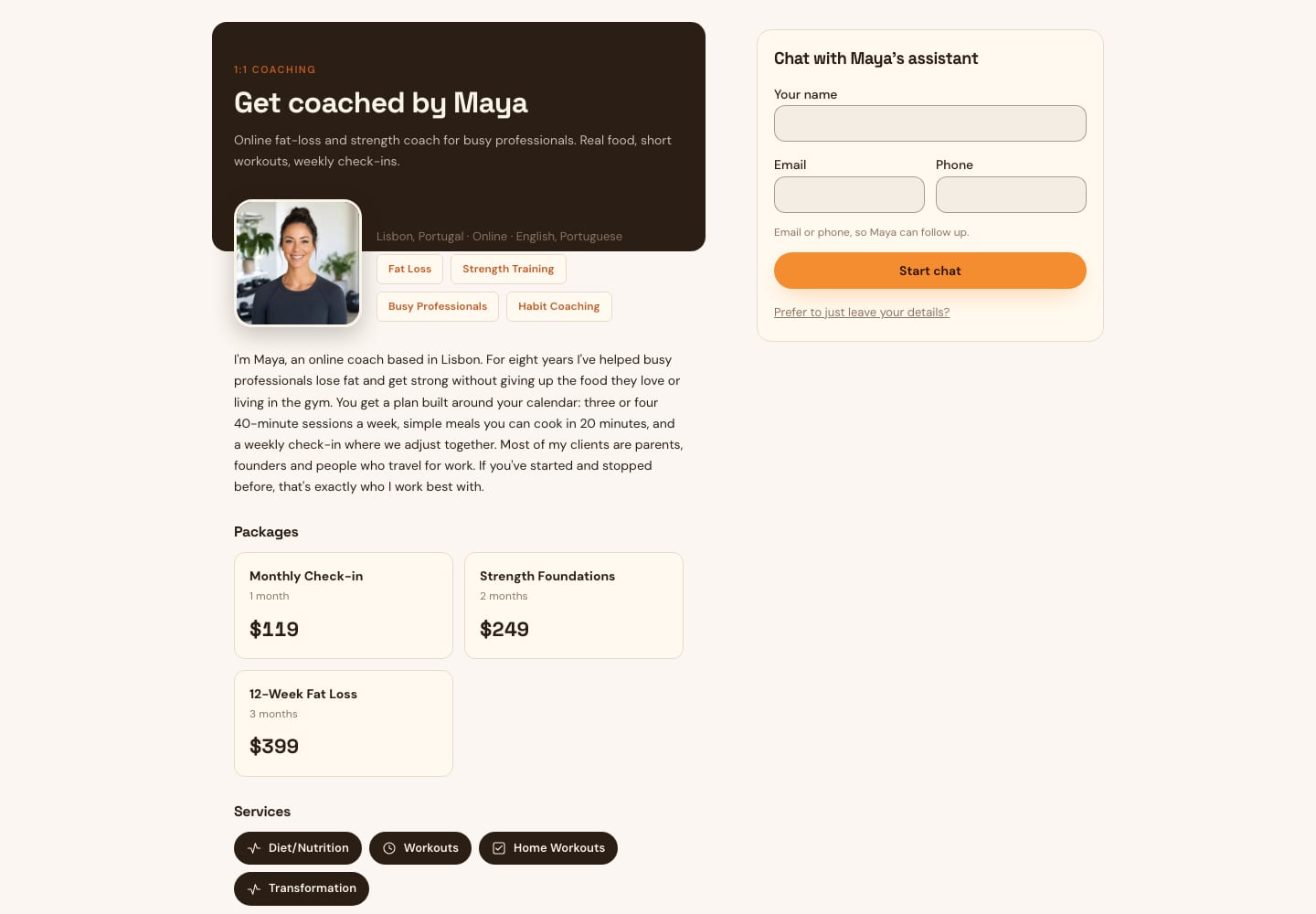
The example coaching page: profile and packages on the left, the assistant chat on the right.
A page converts when a stranger can answer three questions in ten seconds: who is this for, what do I get, and what do I do next. Practical tips:
- A real photo. Not a logo. People hire a person.
- One narrow promise. "Online fat-loss and strength coach for busy professionals" beats "fitness coach".
- Two or three packages with a length and a price you are happy to show.
- Proof. A line about who you have worked with and how long.
- One action. Chat, leave details or book a call, all on the same page.
Search engines can only send people to a page that exists and says clearly what you do. Writing your specialties and city in plain words in your bio helps both people and search.
Step 3: answer enquiries when they happen
Most enquiries arrive when you are coaching, asleep or on a call. The assistant on the page answers a prospect's questions from your own FAQ, asks a few qualifying questions and records their details in Leads. It is introduced as your assistant, never as you. See how the AI assistant works.
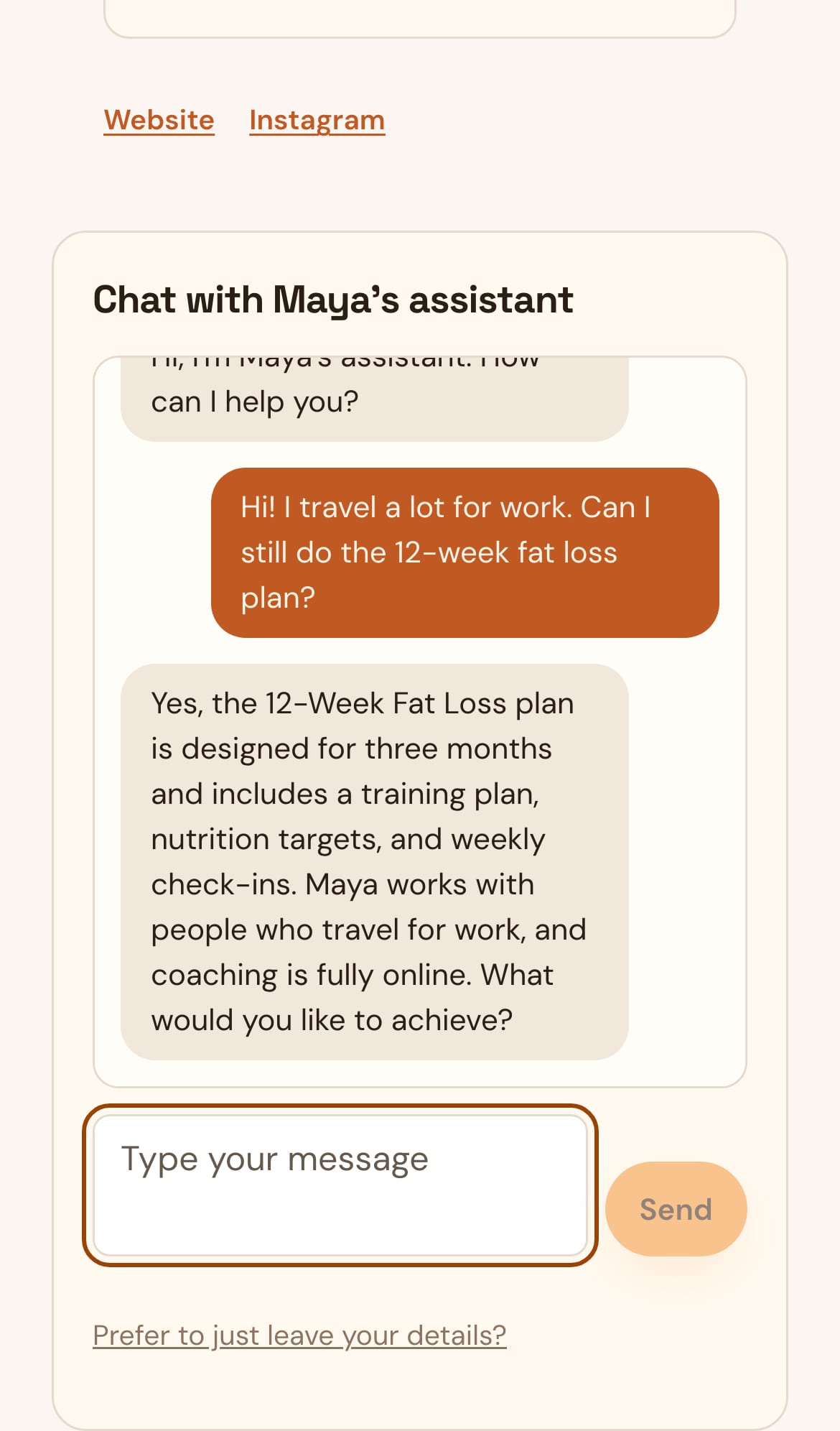
A prospect asks the example coach's assistant a question about travelling.
Common mistakes that cost enquiries
- A bio link that goes to a general website. The visitor has to hunt for how to work with you. Send them straight to a page with one action.
- No answer for two days. A prospect who asked a question on Monday has often chosen another coach by Wednesday. That is the gap the assistant fills.
- Hiding the price. You do not have to show everything, but a visitor who cannot tell whether you are in their range will not ask.
- Several different bios. If your Instagram, TikTok and WhatsApp each point somewhere else, you cannot tell which one works. Use the same link and read the sources in Leads.
Step 4: the bio link ties it together
Whatever you post on Instagram, TikTok or Threads, your bio link, ultrafit360.com/@<username>, points to one place. It can open your coaching page or a link page of quick buttons, with a QR code for print. See the link in bio guide. For content ideas that send people there, read how to get more personal training clients.
Step 5: book the call and keep the source
From the coaching page or the link page, a prospect can book a call, or you can send a one-time booking link from a lead's panel. Every enquiry arrives in Leads with its source, such as Link page, Instagram or Web form, so after a month you can see which bio, post or listing brought people in.
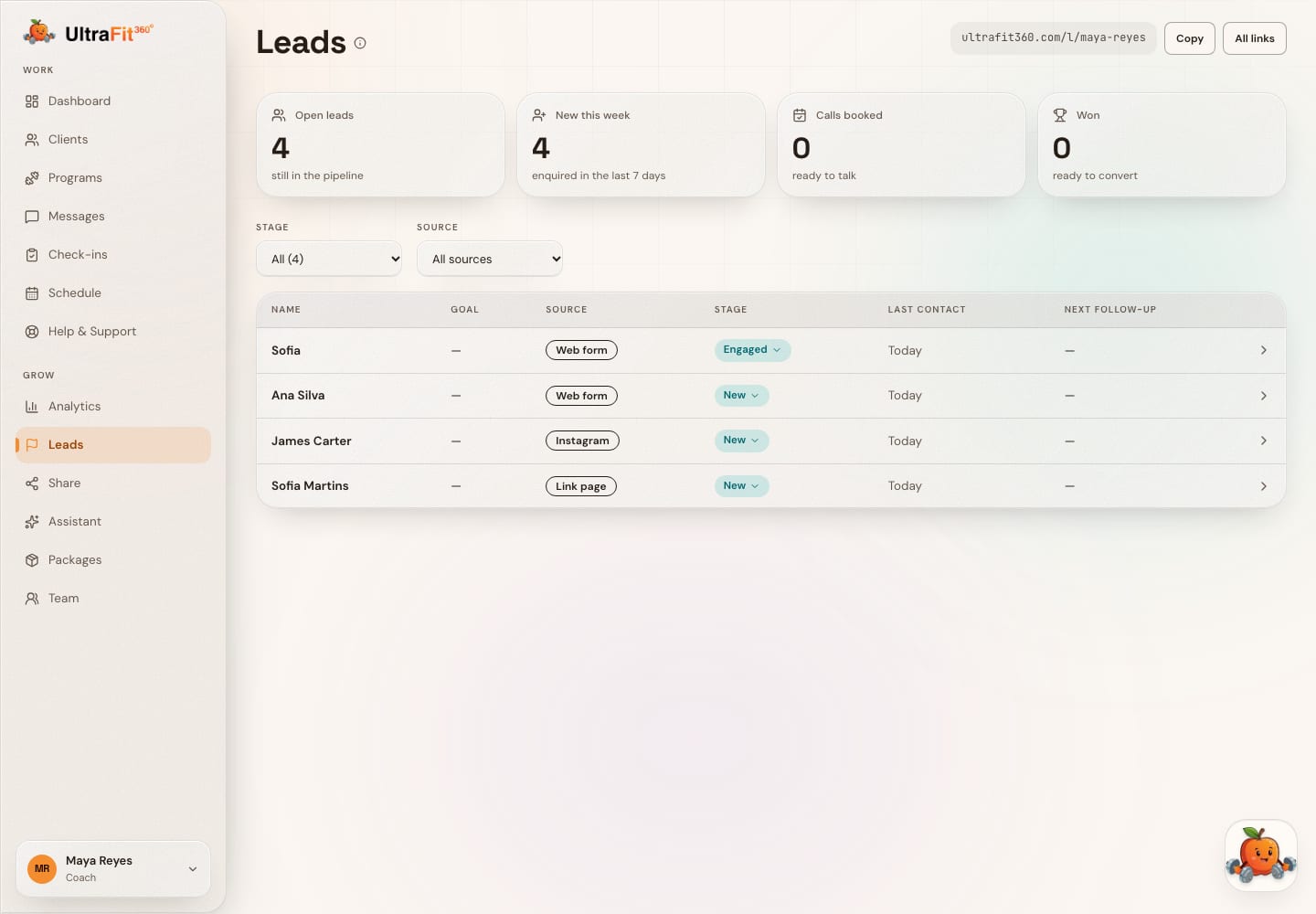
Leads for the example coach: source, stage and last contact for each enquiry.
See online booking for fitness coaches for how to set up the page and links.
What this does not do
It does not guarantee clients. A directory listing and a good page make you findable and easy to enquire with; you still have to run the call and deliver good coaching. UltraFit360 has no client payments or billing, so charge clients with Stripe, PayPal or another tool. And it does not replace posting: a bio link with nobody looking at your bio brings nobody.
A checklist for this week
- Fill in Profile Settings: photo, city or online, specialties, bio, packages.
- Turn on Show me in Find a coach in Profile Settings.
- Upload your FAQ to Assistant and turn on the chat.
- Set your hours in Schedule.
- Copy your bio link from Share into every bio.
- Open Leads every morning for a week.
Running a bigger practice? See UltraFit360 for online personal trainers.
To put these steps together with your social media posting, a weekly routine and the numbers to watch, read the fitness coach client funnel guide.
Frequently asked questions
How do online fitness coaches get found by new clients?
Through a mix of discovery and referral: social content that points to one link, directory listings where people search for a coach by city or specialty, and a public coaching page that explains who you help and lets a visitor ask a question or book a call. The key is a single clear path from interest to call.
Is there a directory where clients can find my coaching?
UltraFit360 has a coach directory at ultrafit360.com/find-a-coach where people can look for coaches by city or online, and by specialty. Trainerize and Trainera also have public coach directories, and Everfit has a marketplace in beta.
What should be on my coaching page?
A real photo, one narrow promise, two or three packages, a line of proof and one clear next step: chat, leave details or book a call. UltraFit360's coaching page includes a profile, packages, an enquiry form and the AI assistant.
Do I need a website as well?
Not to start. A coaching page and a bio link cover what most new coaches need. You can add your own website link to your profile, and many coaches do, but it is not required to be found and to take enquiries.
How do I know which channel brings clients?
Enquiries arrive in Leads with a source, such as Link page, Instagram or Web form. Share also shows how many times your bio link was opened and how many taps each link button got in the last 28 days.
See the coach platform
A coach directory listing, a coaching page with an AI assistant, booking and a bio link, then the client app.
Early bird offer: UltraFit360 is free for coaches today. Paid plans launch in January 2027. The first 250 coaches and teams stay free for 12 months after launch; every other coach gets 6 months free from launch.