
A Linktree-style page lists your links. A good one for a coach does one more thing: it gets a stranger on a call. If your bio link goes to a list of nine equal buttons, a visitor has to decide what you want from them. If it goes to a page with one clear button, "Book a call", most will take it.
This guide shows how the UltraFit360 bio link works, how to choose what it opens, and how to use link buttons and the Share page. The screenshots in this article show an example coach, Maya Reyes, a made-up online fat-loss and strength coach in Lisbon. They are not a real coach or real clients.
The bio link and its QR code
Every coach gets one short address: ultrafit360.com/@<username>. Put it in your Instagram, WhatsApp or Threads bio. The same page has a QR code you can download and print on a flyer, a business card or a poster at your gym.
In Share, the top card shows your bio link, the QR code, and how often it has been opened and tapped in the last 28 days. Press Copy link to copy it, Open to see what a visitor sees, or Download QR for the code.
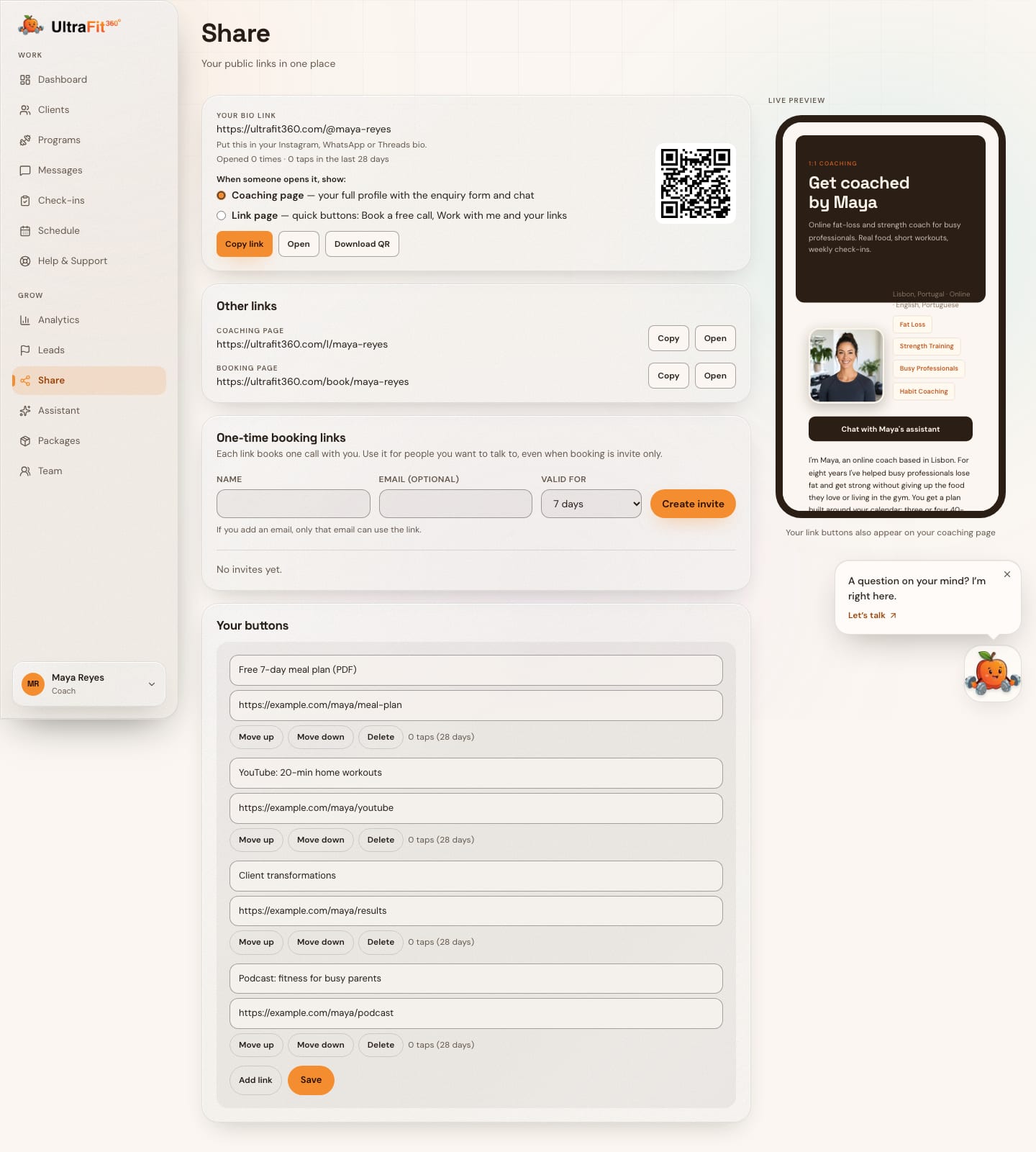
The Share page of the example coach: bio link and QR code at the top, link buttons at the bottom, a live preview on the right.
Choose what it opens: coaching page or link page
Under the bio link, Share asks "When someone opens it, show:" and gives two choices. Until you pick one, your bio link opens your coaching page. You can switch at any time; the link and QR code stay the same, so nothing in your bio needs changing.
- Coaching page. Your full profile with photo, specialties, packages, the enquiry form and the AI assistant chat. Pick this if someone who follows you is likely ready to enquire.
- Link page. A short page of quick buttons: "Book a free call", "Work with me" and your own links. Pick this if you want one tap to a call, with your content (a podcast, a PDF, a YouTube channel) a tap away.
You can switch at any time. Try the coaching page first if you are new, because it answers more questions on its own; try the link page if your followers already know you and just need the next step.
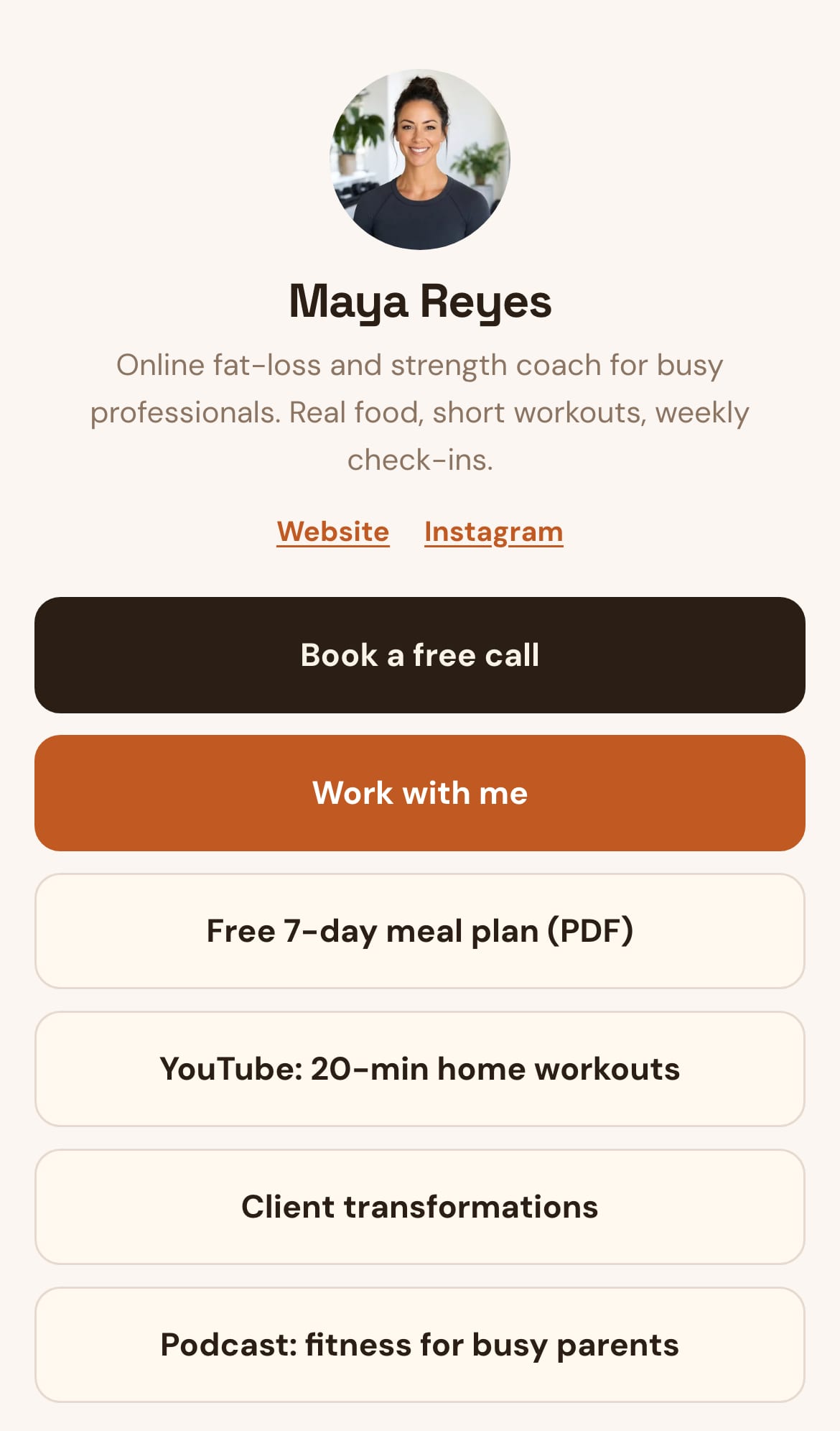
The example coach's link page: the two default buttons first, then her own links.
Link buttons with tap counts
In the Your buttons section of Share, add a label and a URL for each link: a free guide, a YouTube channel, results, a podcast. Move buttons up and down to set the order, delete the ones you stop using, and press Save. Each button shows how many taps it got in the last 28 days, so you can see which ones people actually use and drop the rest.
The buttons appear on the link page, and also on your coaching page, so the same list works whichever you choose. Counts are opens and taps, nothing more detailed than that. Keep to four or five buttons; every extra one dilutes the call button.
What to put on the buttons
The two default buttons, "Book a free call" and "Work with me", do the selling. Your own buttons should be things that warm a visitor up without taking them off the page for good: a short meal plan PDF, a YouTube series, a results page or a podcast. Name them for what the visitor gets ("20-minute home workouts"), not for the platform ("YouTube"). Put the content that best shows how you coach first, and leave out links you would not mind a stranger never opening.
Review the tap counts every few weeks. A button with no taps in 28 days is not helping; a button that gets more taps than the call button may mean your content is better at convincing people than your offer is at explaining itself.
Where the Share page fits
Share is the one place for everything public: your bio link and QR code, the coaching page address, the booking page address and the one-time booking links. A live preview on the right shows what visitors see as you change the setting. If you ever forget a link, this is where to copy it.
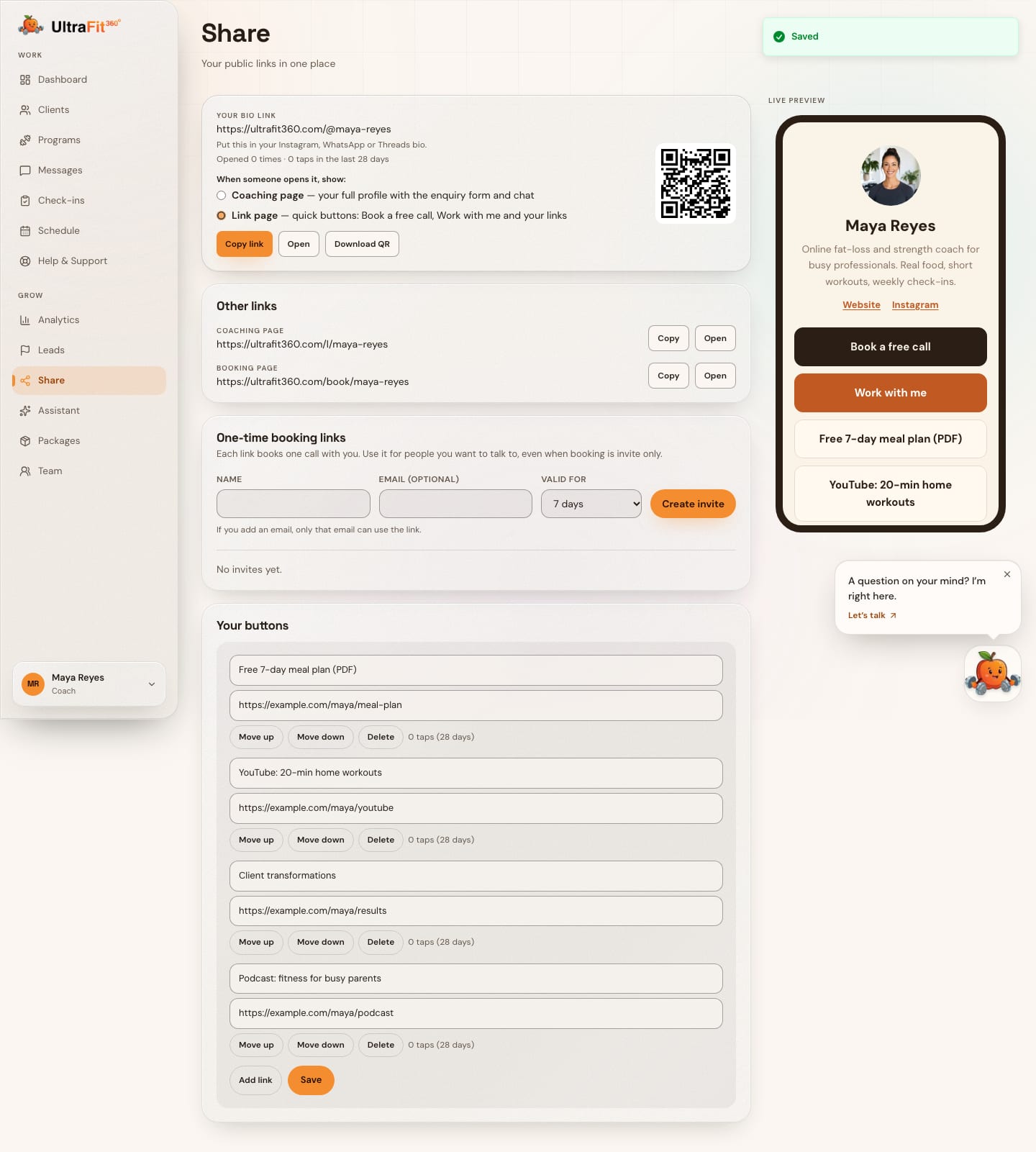
The same Share page with Link page selected, showing the preview.
What happens after someone taps
A visitor on the coaching page can chat with your assistant, leave details or book. A visitor on the link page can book a call, or tap "Work with me", which opens your coaching page. Enquiries and bookings reach Leads with their source recorded, for example Link page or Instagram, so you know which bio is working. See how the assistant answers enquiries and how booking works.
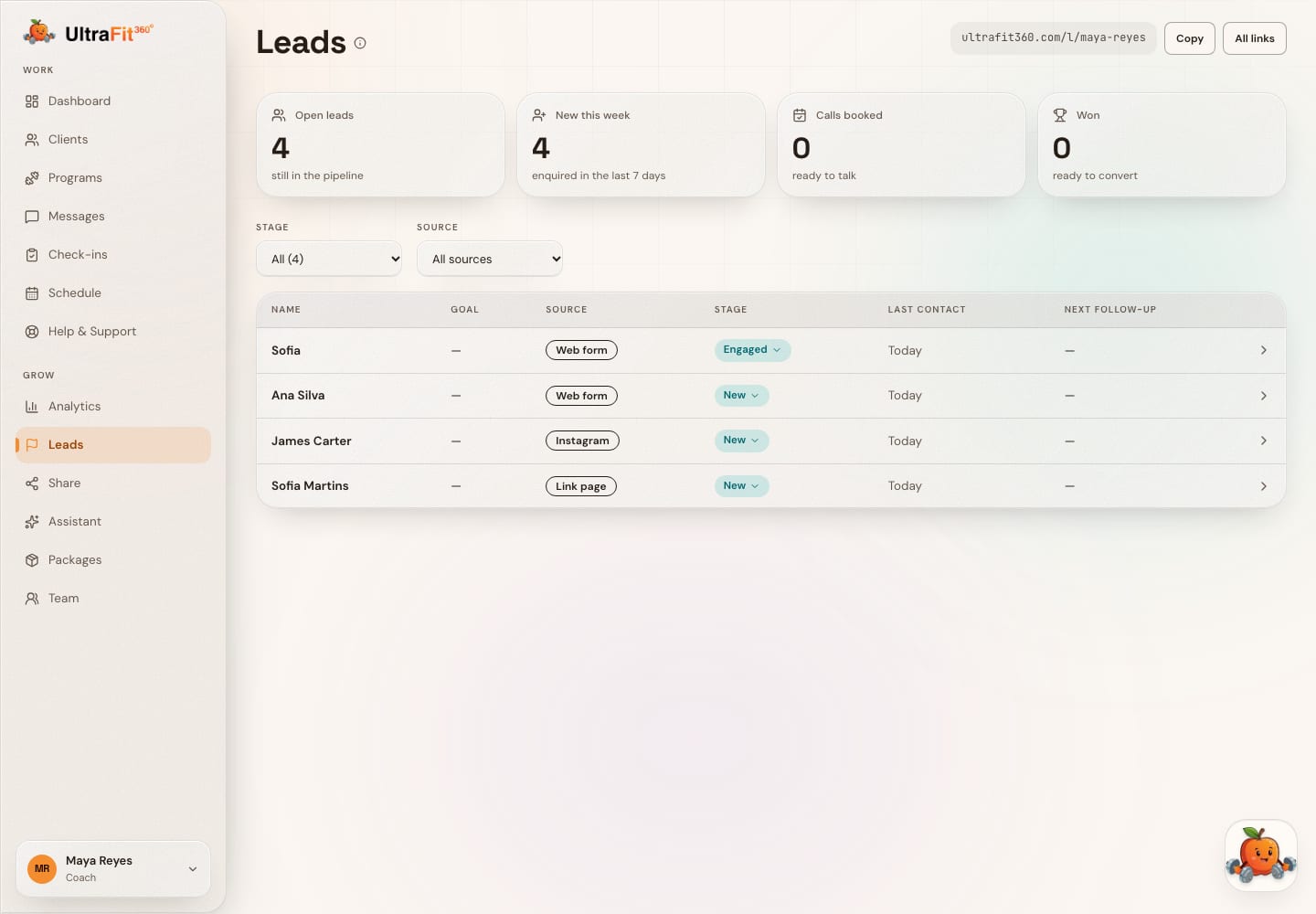
Leads for the example coach, with a source on every enquiry.
How this compares with other coaching apps
Among the coaching apps we checked on November 26, 2026, none lists a link-in-bio page on its own site. Some give you a link you can put in your bio: TrueCoach says to share the public profile across "social media, bio links, and more" (see truecoach.co), and Coachway says a lead form's public URL can go "in a bio, email signature, or QR code" (see coachway.io). That is one link to one thing. A dedicated link-in-bio tool such as Linktree is built for long lists of links and may suit you better if that is all you need. The UltraFit360 link page is deliberately plain: a photo, a short bio and buttons, with a call button first.
The advantage here is not the page itself but what is behind it: the taps lead to a coaching page with an assistant, booking and Leads, all in one account. The Coachway comparison shows how that differs from a form-only approach.
Set it up in ten minutes
- In Profile Settings, check your photo, bio and packages.
- In Share, choose coaching page or link page, and add your buttons.
- Press Copy link and put it in your bio on every platform. Download the QR code for print.
- Look at the tap counts after a couple of weeks and remove the buttons nobody uses.
If you have no booking set up yet, start with scheduling, so the call button has somewhere to go. For more ways to find clients without ads, read how to get more personal training clients.
Your bio link is one step in a bigger path from post to client. The fitness coach client funnel guide shows how it fits with the assistant, Leads and booking, with a weekly posting routine.
Frequently asked questions
What is a link in bio for fitness coaches?
It is the one link you put in your Instagram, WhatsApp or Threads bio. For a coach it should do more than list links: it should lead to a page that explains what you offer and lets a visitor enquire or book a call. UltraFit360's bio link opens either your coaching page or a link page of quick buttons.
What is my UltraFit360 bio link?
It is ultrafit360.com/@ followed by your username, for example ultrafit360.com/@maya-reyes for the example coach in this article. You can find it, copy it and download its QR code in Share.
Should my bio link open the coaching page or the link page?
Use the coaching page if you want the profile, packages, enquiry form and assistant in one place. Use the link page if you want one clear tap to a booked call plus your own links. You can switch in Share at any time and compare the open and tap counts.
Can I see how many people tap my links?
Yes. Share shows how many times the bio link was opened and tapped in the last 28 days, and each link button shows its own tap count for the same period. There is no more detailed analytics than counts.
Is this a replacement for Linktree?
For a coach who wants people to book a call, it can be. If you need a long list of links or a designed page, a dedicated link-in-bio tool may suit you better. The UltraFit360 link page is a short page with buttons, built to send people to your coaching page and booking.
See the coach platform
A coach directory listing, a coaching page with an AI assistant, booking and a bio link, then the client app.
Early bird offer: UltraFit360 is free for coaches today. Paid plans launch in January 2027. The first 250 coaches and teams stay free for 12 months after launch; every other coach gets 6 months free from launch.