
Most coaches who post every day still get only a few enquiries. Usually the content is not the problem. The gap is the path between "that post was useful" and "I want to work with you". A client funnel is that path: each step hands the person to the next one without making them hunt. This guide sets it up with the tools coaches already use (Instagram, TikTok, Threads, YouTube, WhatsApp) and the coach directory, then shows how to read the numbers so you know what to fix. The screenshots show an example coach, Maya Reyes, a made-up online fat-loss and strength coach in Lisbon. They are not a real coach or real clients.
Other coaching apps manage the clients you already have. UltraFit360 also gets you clients: you're listed in the coach directory, your coaching page has an AI assistant that answers enquiries, prospects book a call from your page or your bio link, and they become clients in the app.
The funnel in six steps
- Get seen. Social posts and the coach directory bring people to you.
- One link. Every bio, story and QR code points to the same place: your bio link.
- Answer. The AI assistant on your coaching page answers questions straight away, day or night.
- Capture. Every enquiry lands in Leads with its source, so nobody is lost in your DMs.
- Convert. The prospect books a free call, or you send them a one-time booking link.
- Keep. After the call they join as a client in the app, and their results feed step 1.
Most coaches put all their effort into step 1 and leave steps 2 to 5 to chance. Those middle steps are where interested people drop out.
Step 1: get seen on social media and in the directory
Post for the person you want to coach, not for other coaches. Four kinds of post bring enquiries more often than workout clips alone:
- Client results, with the client's permission: what they wanted, what you changed, what happened.
- Answers to the questions you get in DMs: "Can I lose fat without giving up rice?", "How do I train when I travel?"
- How you work: what a week of coaching with you looks like, what a check-in involves.
- Who it is for: "If you are a busy parent who has restarted five times, this is for you."
End each post with one action, the same one every time: "Questions? Link in bio." One clear ask works better than a different ask on every post.
Where the link goes depends on the channel:
| Channel | Where your link goes | What to say |
|---|---|---|
| Bio link, plus a link sticker on stories | "Link in bio to ask me anything" | |
| TikTok | Bio link | "Link in my bio to book a call" |
| Threads | Bio link | "My bio link answers this in detail" |
| YouTube | First line of the description and your channel links | "Book a call: link in the description" |
| WhatsApp Status and broadcasts | Your coaching page link, tagged (see step 4) | "Two spots open this month, details here" |
| Posters, flyers, gym noticeboards | The QR code from Share | "Scan to ask me a question" |
Social media only reaches people who already follow you or who the algorithm shows you to. The coach directory at ultrafit360.com/find-a-coach reaches people who are actively looking for a coach by city, online coaching or specialty. Turn on Show me in Find a coach in Profile Settings. See how fitness coaches get found for what a good listing and coaching page need.
Step 2: one link everywhere
Your bio link is ultrafit360.com/@<username>. Copy it from Share in the coach portal and put it in every bio. By default it opens your coaching page, with your profile, packages, the enquiry form and the assistant. If you would rather show a page of buttons (Book a free call, Work with me, your YouTube, a free guide), switch the bio link to your link page on Share. Your bio and QR code stay the same when you switch.
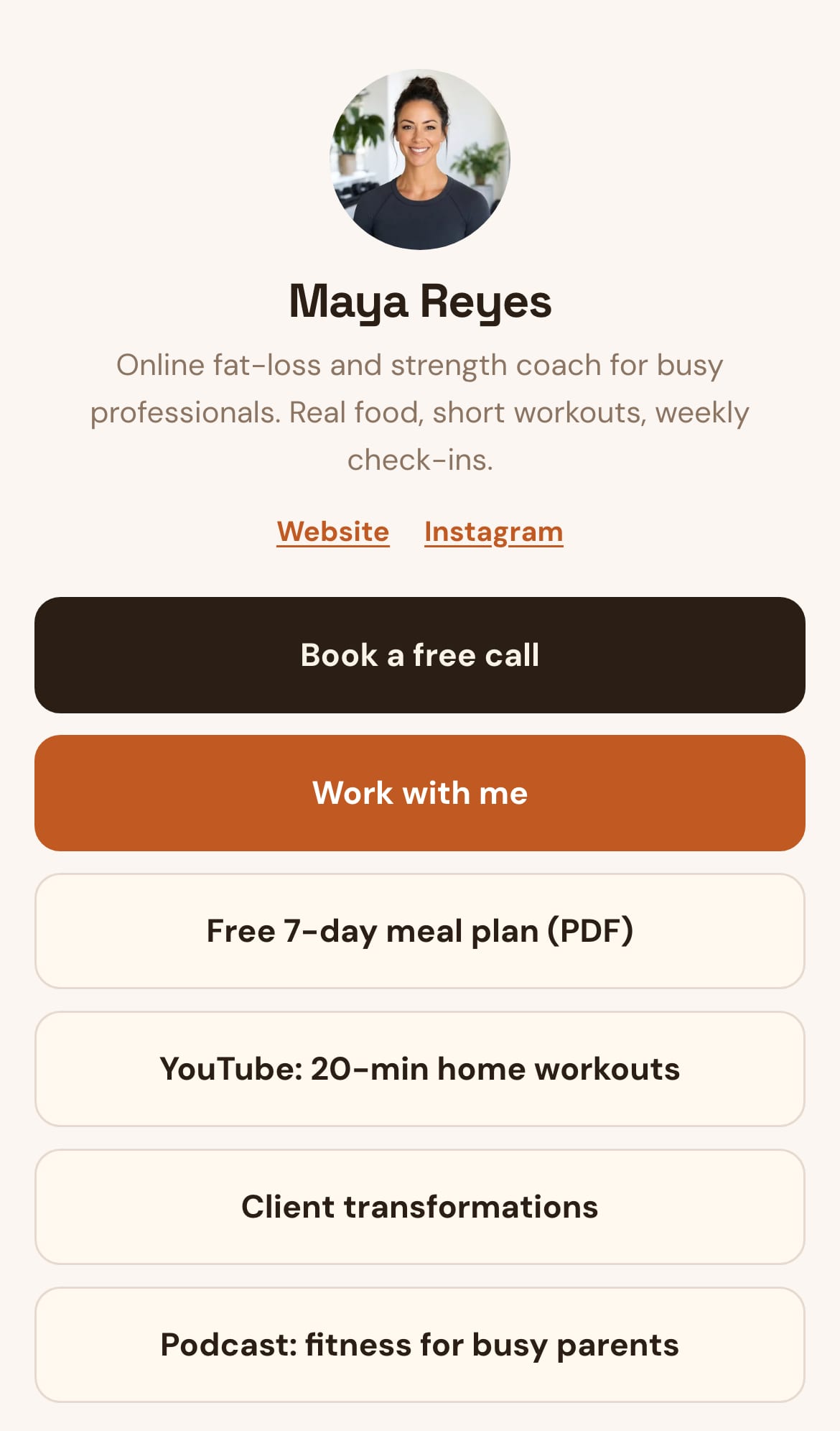
The example coach's link page: book a call first, then her own links.
Use Download QR on Share for anything offline: a poster at the gym, the last slide of a carousel, the end card of a YouTube video, a business card. Using one link everywhere also means the open and tap counts on Share describe all of your traffic, not a slice of it. More in the link in bio guide.
Step 3: answer every enquiry, even at midnight
People read your post on the train, tap your link at 11 p.m. and have a question about price or about training around a bad knee. If the answer takes two days, many of them have moved on. The AI assistant on your coaching page answers from the FAQ you give it, asks a few questions about their goal and saves their details in Leads. It is introduced as your assistant, never as you.
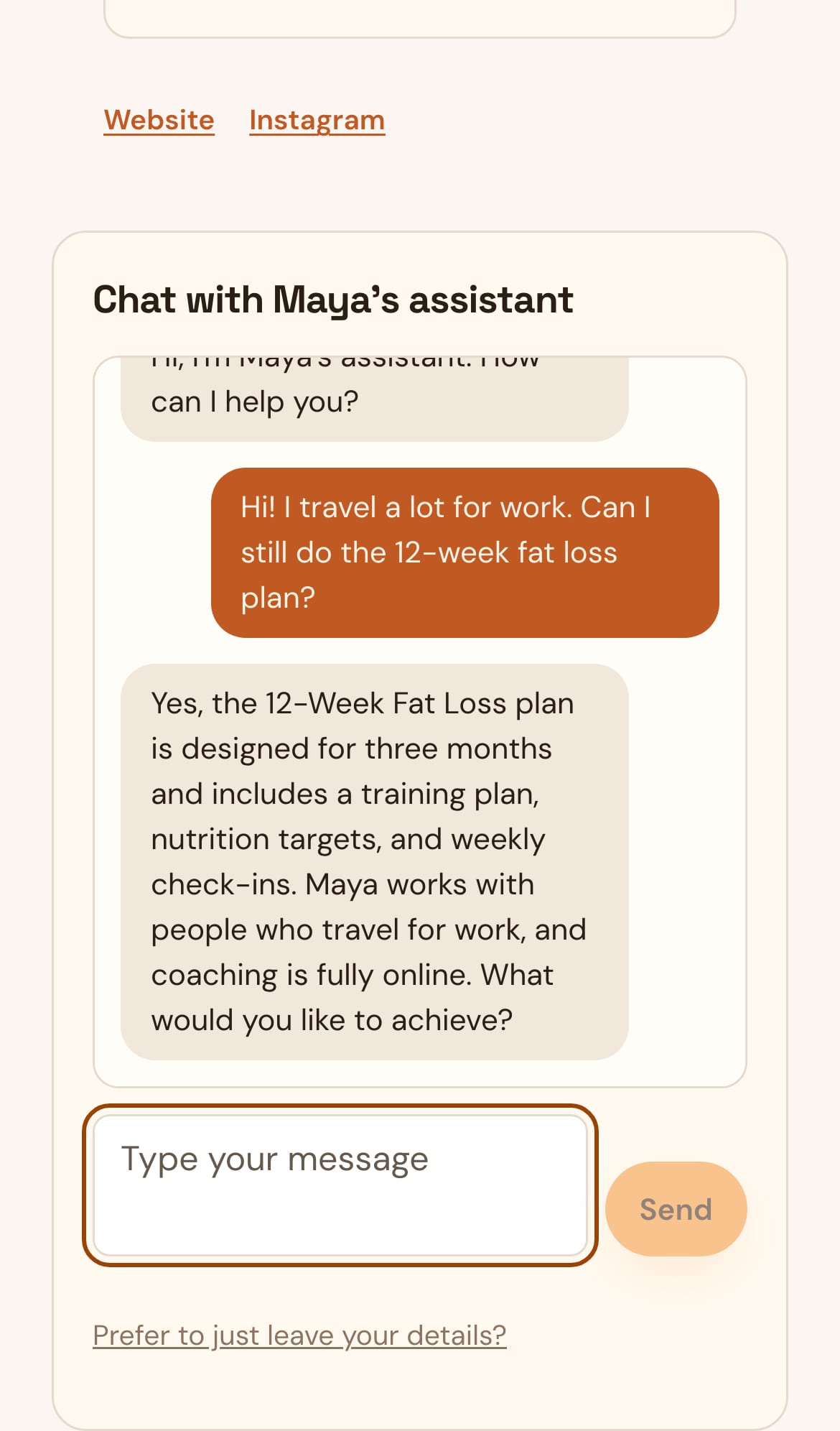
A prospect asks the example coach's assistant about training while travelling.
The best FAQ is your DM history. Copy the ten questions you answer most (price, how check-ins work, whether you coach beginners, what happens if they miss a week) into the assistant's FAQ. When someone DMs you "how much?", reply with your bio link: they get the answer and you get a lead with their details. See how the AI assistant works.
Step 4: capture every lead with its source
Every enquiry, whether from the form, the assistant or a booking, arrives in Leads with a source and a stage. The sources tell you which channel sent the person:
- Link page: they came through your bio link.
- Web form: they opened your coaching page directly, for example from the coach directory or a link you pasted.
- Instagram or WhatsApp: they used a link you tagged for that channel.
To tag a link, add ?src=instagram or ?src=whatsapp to the end of your coaching page address when you paste it into a story link sticker or a WhatsApp message, for example ultrafit360.com/coaches/maya-reyes?src=whatsapp. Your bio link always shows as Link page, so you can tell bio traffic and story or WhatsApp traffic apart.
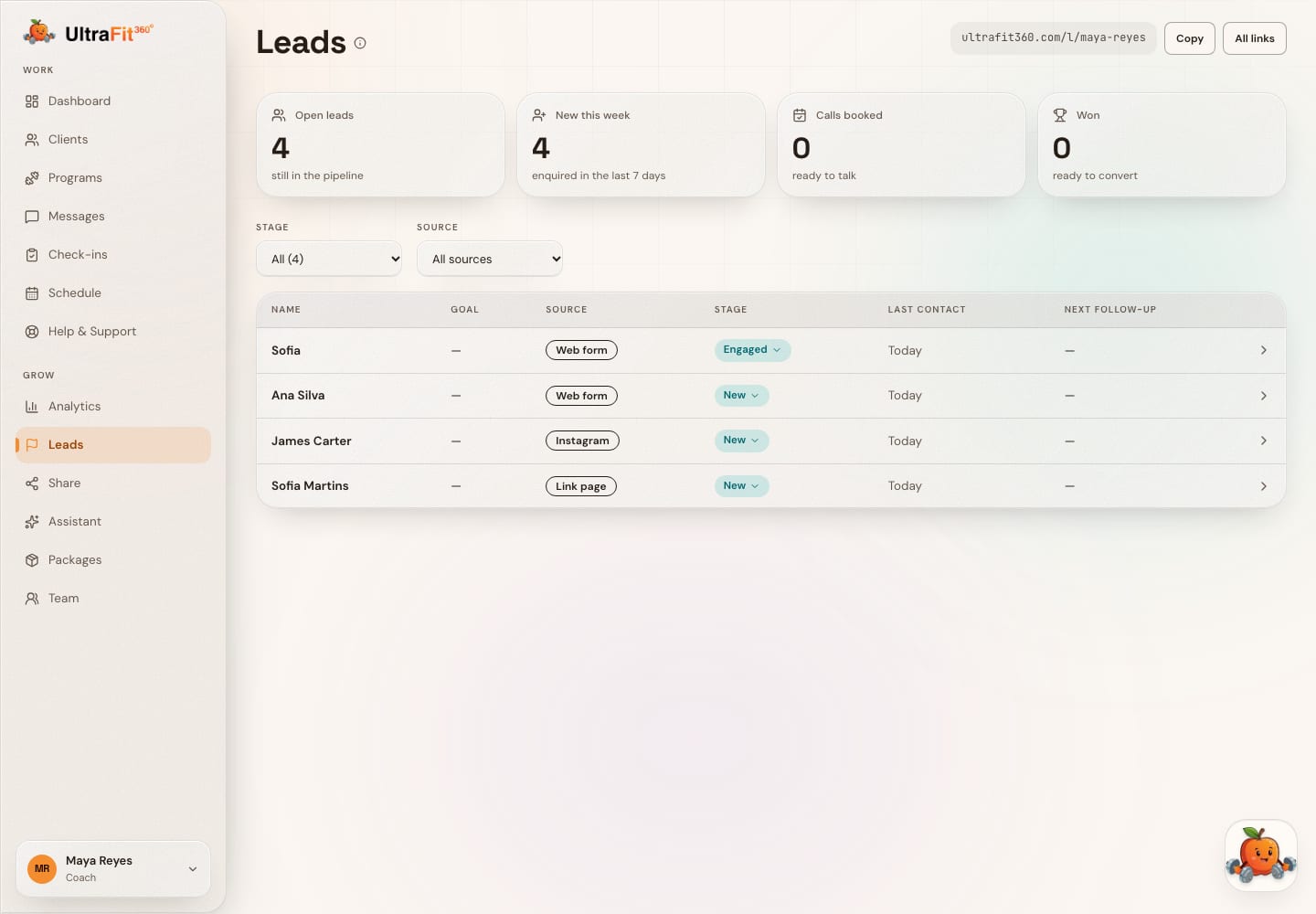
Leads for the example coach: each enquiry with its source, stage and last contact.
Move each lead through the stages as you talk: New, Engaged, Qualified, Call booked, Trial, Won or Lost. It takes a few seconds and it is what makes the numbers in the last section possible.
Step 5: turn leads into booked calls
A lead is a person who is interested. A booked call is a person who has set aside time to talk to you. Make the call the obvious next step everywhere:
- Turn on booking in Schedule and show "Book a free call" on your coaching page and link page, so a prospect can book without waiting for you.
- For someone who asked a question in the chat or in your DMs, open their panel in Leads and use Send booking link. It creates a one-time link that works for 7 days and opens a message you can edit, sent from your own WhatsApp or email.
- Reply to every new lead the same day. A short, personal message ("Saw your question about training with a knee injury, happy to talk it through: here is a link to book 30 minutes") beats a perfect message two days later.
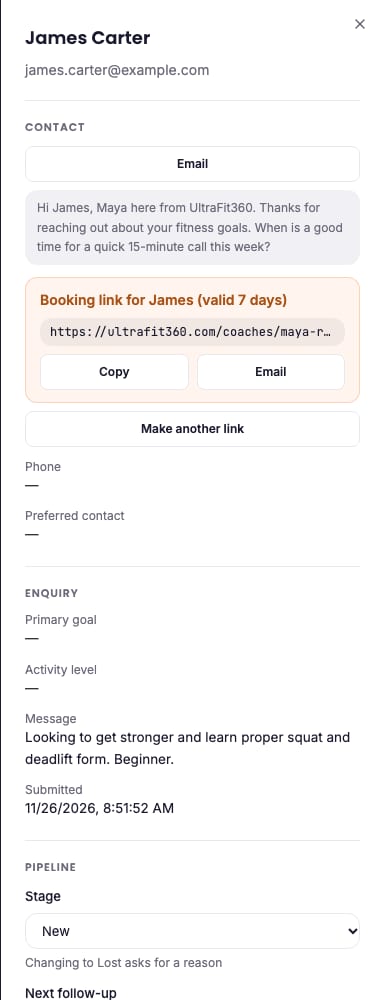
Sending a one-time booking link from a lead's panel.
Setup details are in online booking for fitness coaches.
Step 6: keep the client, and let results feed step 1
After a good call, invite the person as a client. They get their program, nutrition targets, check-ins and progress tracking in the app, and you coach them from the same portal where they started as a lead. Their progress, shared with permission, becomes next month's client result post, which brings in the next lead. That loop is why the funnel gets easier the longer you run it. See why clients keep their progress.
A weekly routine that fits around coaching
| When | What to do | Time |
|---|---|---|
| Every morning | Open Leads, reply to anything New, send booking links to anyone Qualified | 10 min |
| 3 times a week | One post: a client result, an answer to a DM question or how you work. End with "link in bio" | 30 min each |
| Most days | One story with a link sticker to your tagged coaching page or booking page | 5 min |
| Once a week | A WhatsApp Status or broadcast with your WhatsApp-tagged link | 5 min |
| Friday | Read the numbers below; add any new questions from chats to the assistant's FAQ | 15 min |
Read the numbers and fix the leak
Two places in the portal give you the whole picture:
- Share shows how many times your bio link was opened and how many taps each button on your link page got in the last 28 days.
- Leads shows how many leads are at each stage, including calls booked, and you can filter by source.
Write down four numbers each Friday: bio link opens, new leads, calls booked and new clients. Then look for the biggest drop:
- Many opens, few leads: your page is not answering "who is this for and what do I get". Sharpen your bio and packages, and fill in the assistant's FAQ.
- Many leads, few calls: you are replying too slowly or not asking for the call. Send booking links the same day.
- Many calls, few clients: the offer or the call itself needs work. Ask the people who said no what held them back.
- Few opens: post more often, and say "link in bio" at the end of every post.
Filter Leads by source once a month. If WhatsApp sends three times the leads Instagram does for a fraction of the effort, spend more time on WhatsApp.
What this does not do
It does not post for you, run ads or schedule content; use your social apps for that. It does not guarantee clients: the funnel makes it easy to go from interest to a call, and you still have to run a good call and coach well. UltraFit360 has no client payments or billing, so charge clients with Stripe, PayPal or another tool.
Growing beyond solo coaching? Read how to scale a coaching business or see UltraFit360 for online personal trainers.
Frequently asked questions
What is a client funnel for a fitness coach?
It is the path a stranger takes to become a client: they see your content or your directory listing, open one link, get their questions answered, leave their details, book a call and join as a client. Setting up each step on purpose means fewer interested people drop out along the way.
Where should my Instagram bio link go?
To one page with one clear next step. For most coaches that is a coaching page with packages, an enquiry form and a chat. If you have several things to share, a link page with "Book a free call" at the top works too. Use the same link in every bio.
How do I know whether Instagram or WhatsApp brings me clients?
Add ?src=instagram or ?src=whatsapp to your coaching page link when you share it on that channel. Leads then shows the source of each enquiry, and you can filter by it. Leads from your bio link show as Link page.
Do I need to run ads?
No. A steady posting routine, a directory listing and a page that answers questions turn existing attention into enquiries. Ads can add more people at the top later, once you know the rest of the funnel works.
How fast should I reply to a new enquiry?
The same day if you can. The AI assistant answers straight away, so the prospect is not left waiting, but a short personal message with a booking link from you is what usually turns a lead into a call.
Set up your client funnel
A coach directory listing, a coaching page with an AI assistant, a bio link with a QR code, booking and Leads, then the client app.
Early bird offer: UltraFit360 is free for coaches today. Paid plans launch in January 2027. The first 250 coaches and teams stay free for 12 months after launch; every other coach gets 6 months free from launch.